Zenith™ 0.1, Early accessThe AI development environment for Zoho Creator

Ship Creator features
with proof.

Zenith reads your whole Creator app, writes and lints the Deluge, and pushes functions with a diff and a snapshot. It walks you through the steps Creator won't automate, then re-pulls everything to prove it landed.
macOS 13+ · Apple silicon Your Anthropic or OpenAI key
MIRROR
Every function, form and field one @ away. The index lives on your Mac.
LINT
Deluge is checked before anything leaves your machine.
SHIP
Every push is snapshotted first. Roll back in one step.
VERIFY
Re-pulled from live Creator and compared with the plan.
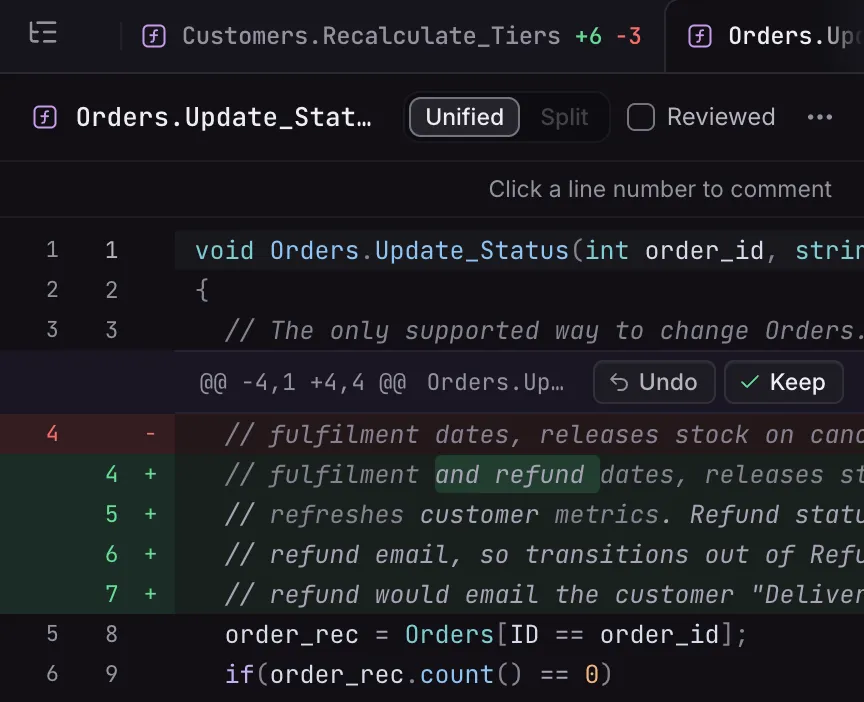
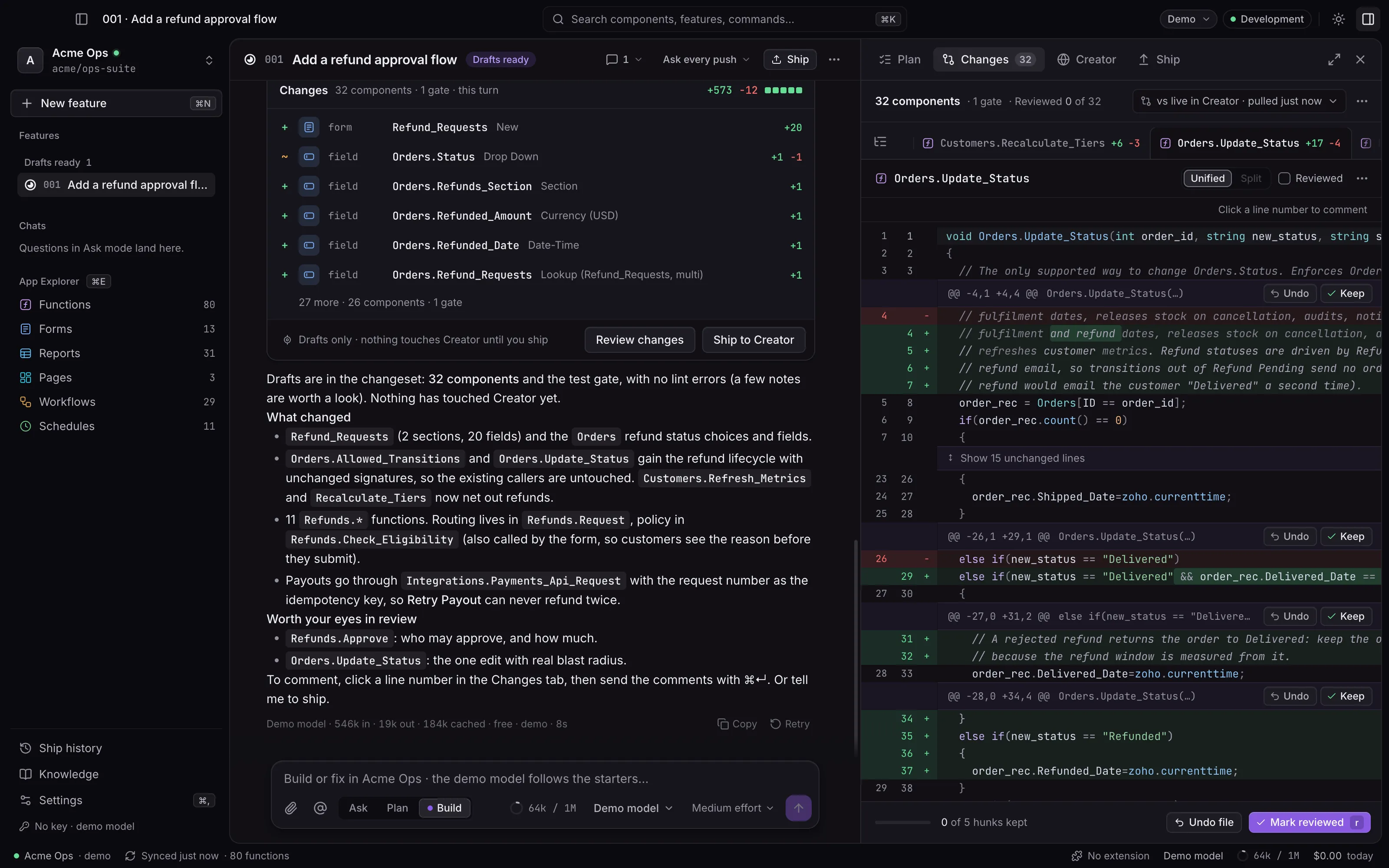
The Zenith desktop app on the Acme Ops demo app. A feature thread shows a Changes card with 32 components and a gate (a new Refund_Requests form, Orders fields and functions, each typed with its line counts) and a summary of what changed. Beside it, the Changes panel reviews a unified diff of Orders.Update_Status against live Creator, with Undo and Keep on each hunk and Mark reviewed.
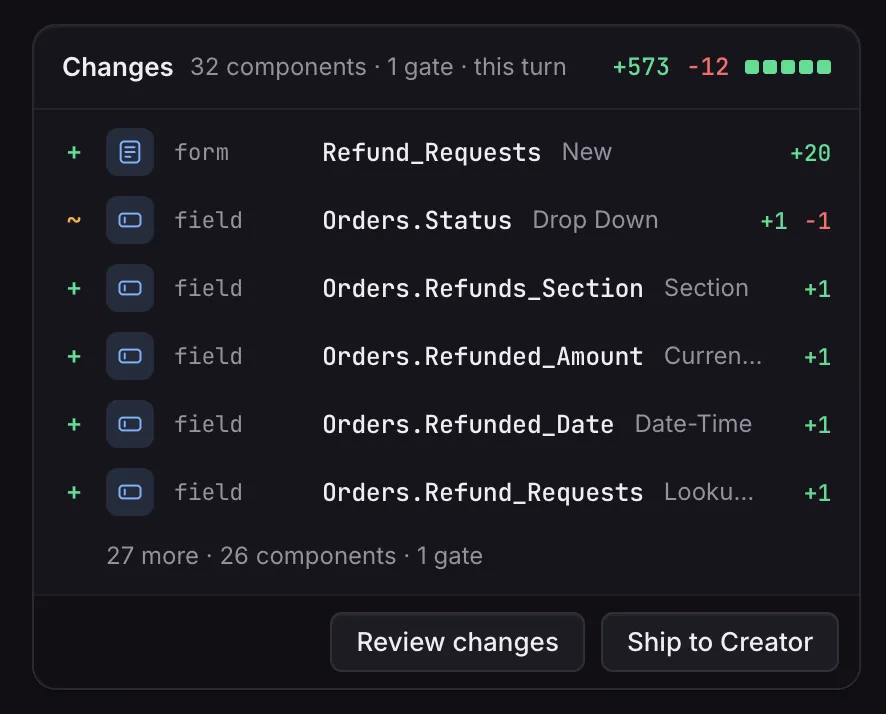
The Changes card: 32 components and 1 gate this turn, +573 and −12. It lists the new Refund_Requests form and five Orders fields, each typed with its line count, then 27 more, with Review changes and Ship to Creator.
The Changes panel on Orders.Update_Status in the Unified view: the first lines are unchanged, then a hunk with Undo and Keep. The hunk rewrites the comment at the top of the function to cover refunds.
FIG. 1
THREAD + REVIEW
1A changeset you can read.Every form, field and function, typed, with its line counts.2Review against live Creator.Each draft is diffed with the code Creator runs now.3Keep or undo each hunk.Then mark the component reviewed.
  • Lint before every push
  • Snapshot before every push
  • Re-pull after every ship
  • Keys stay on your Mac

01–03How it works

From prompt to production,
without the copy-paste.

Creator's builder was made for clicking. Zenith turns a feature request into a reviewed changeset, carries it into your app, and checks the result against live Creator.

01 · BUILD

An agent that knows your app

A local mirror of every function, form and workflow. Type @ to pull any of them into context. Every edit is linted as Deluge.

02 · SHIP

One flow, and it says who acts

Functions push themselves after a snapshot. Fields and workflows become guided steps in an embedded Creator tab, with every value one click from your clipboard.

03 · VERIFY

It catches what didn't land

When you finish, Zenith re-pulls the app and checks every component against the changeset. A skipped Save shows up here, not in front of your client.

FIG. 2Ship to Creator

Every manual step,
walked through with you.

Preflight first, a snapshot before the first push, each step in Creator written out with the values to paste, and a re-sync at the end. Roll back restores the functions Zenith pushed; the undo card lists what to remove by hand.
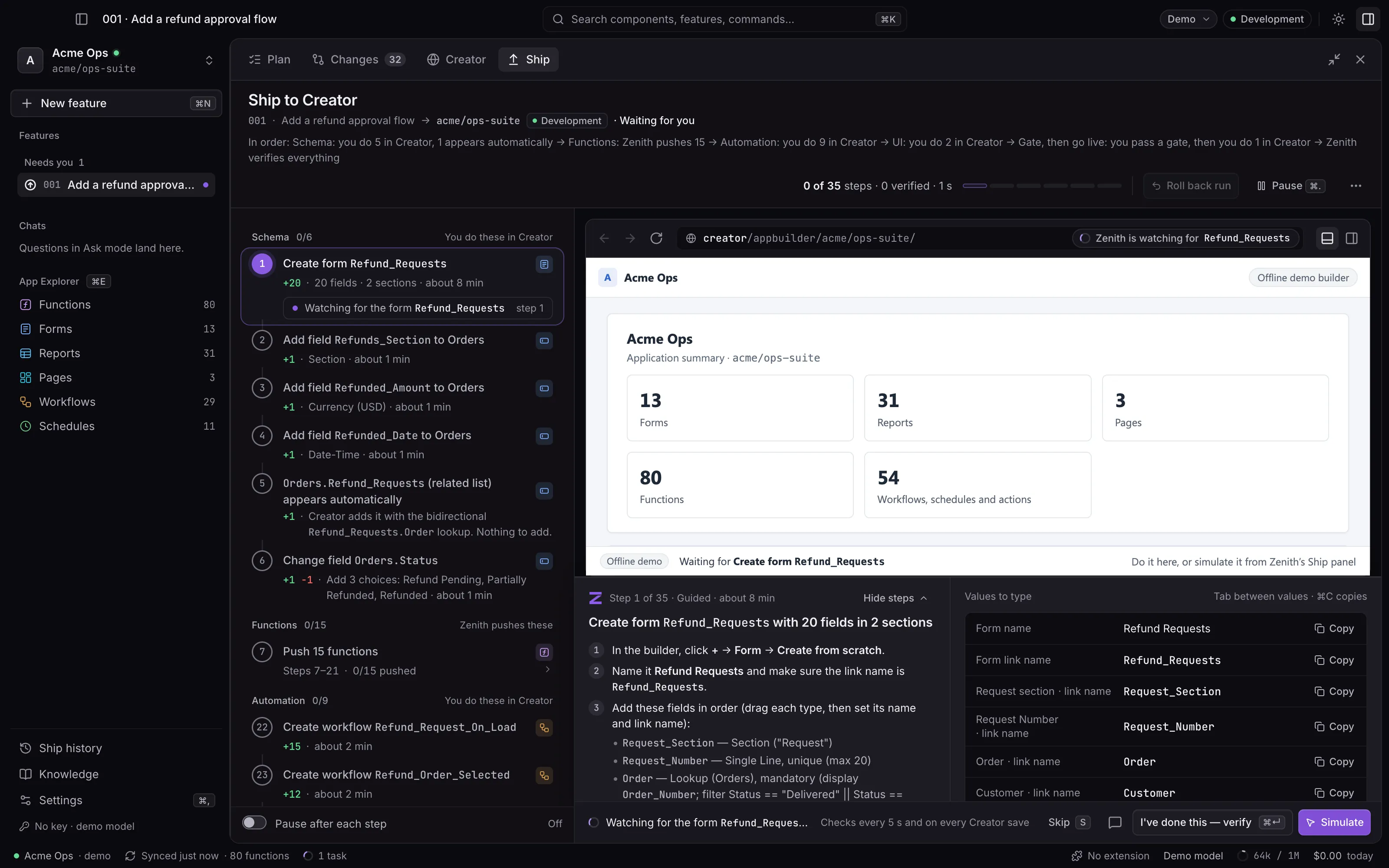
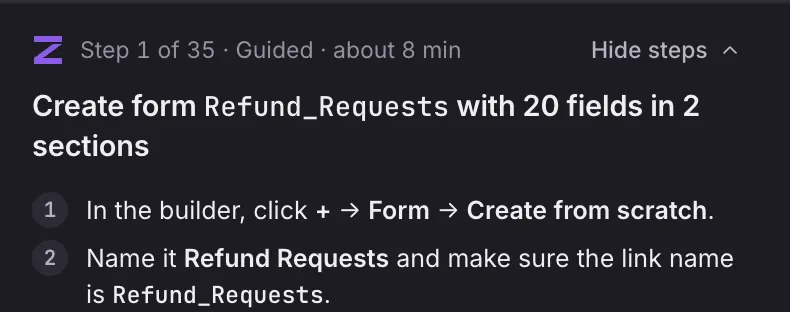
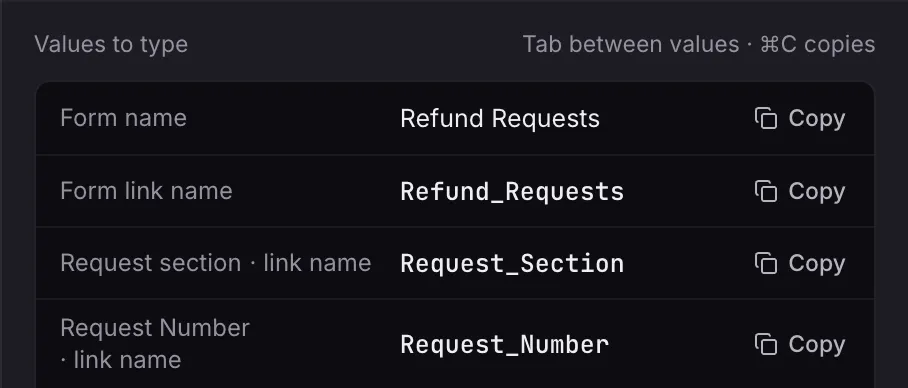
The Ship tab at step 1 of 35 on the Acme Ops demo app. The run order is stated first. The step rail lists the schema steps you do in Creator and the functions Zenith pushes. The embedded Creator pane shows Zenith watching for Refund_Requests. Below are the steps to create the form and the values to type, each with Copy.
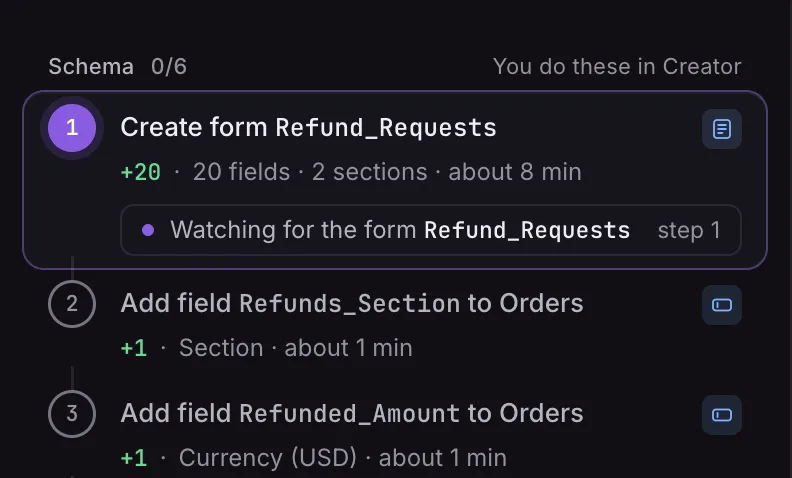
The step rail: Schema, 0 of 6, which you do in Creator. Step 1 is Create form Refund_Requests (20 fields, 2 sections, about 8 min), watching for the form Refund_Requests. The field steps follow.
Step 1 of 35, guided, about 8 min: Create form Refund_Requests with 20 fields in 2 sections. In the builder, click + → Form → Create from scratch. Name it Refund Requests, with the link name Refund_Requests.
Values to type (Tab between values; ⌘C copies): Form name Refund Requests, Form link name Refund_Requests, Request_Section and Request_Number, each with Copy.
FIG. 2
GUIDED SHIP
1Who acts, always.You do these in Creator; Zenith pushes these.2Zenith watches Creator.It checks every 5 s and on every save, then ticks the step.3Steps in plain words.What to click in the builder, in order.4Values, ready to paste.Tab between values; ⌘C copies.

Built inCreator knowledge + Deluge lint

It knows Creator,
down to the field.

General models write Deluge that looks right and fails on save. Zenith ships with a Creator knowledge pack and checks every draft against your app's real forms and fields before you see it.

Refunds.Check_Eligibility functions/Refunds/Check_Eligibility.dg 11
1bool Refunds.Check_Eligibility(int request_id)
2{
3  request = Refund_Requests[ID == request_id];
4  order = Orders[ID == request.Order];
5  amount = request.Requested_Amount;
6  if(order.Status == "Delivered" || order.Status == "Shipped" && amount > 0)
DLG052 Creator reads a || b && c as (a || b) && c: OR binds tighter than AND. Parenthesize the groups you mean.
deluge-lint
7  {
8    order.Refund_status = "Pending";
DLG102 Refund_status is not a field of Orders. Did you mean Refund_Status (Drop Down)?
Fix
9    return true;
10  }
11  return false;
12}
Checked against acme/ops-suite · 42 fields on Orders · before anything is pushed
KNOWLEDGE
24 reference topics on Deluge and Creator, written for the model and loaded only when the task needs them.
LINT
80 rules for Deluge that fails on save or misbehaves silently, 23 of them checked against your app's own schema. Browse the rules
MIRROR
Functions, forms, fields, reports, pages and every kind of workflow, indexed on your Mac with who-calls-what.
YOUR RULES
Bring your CLAUDE.md, AGENTS.md or house style. Zenith keeps what the pack doesn't already cover.
  • Functions
  • Forms
  • Fields
  • Reports
  • Pages
  • Workflows
  • Approvals
  • Blueprints
  • Schedules
  • Batch workflows

SafetyUndo for Creator

Push, don't paste.

Pasting into Creator's editor has no undo and no record. Zenith pushes through a gate: checked first, snapshotted, reversible, and verified after.

  1. PREFLIGHTLint, drift and target are checked before the first push. A failed check blocks it.
  2. SNAPSHOTEvery function Zenith changes is saved before it is touched. Roll back the run in one step.
  3. PERMISSIONWrites are off until you allow them for one app, by typing its link name.
  4. PRODUCTIONProduction, and apps without environments, need a typed confirmation. Apps you mark protected are never written.
  5. VERIFYAfter the run Zenith re-pulls every component and compares it with the plan.

Bring your own keyWhere your code goes

Your code never
touches our servers.

Zenith runs on your Mac. It talks to Creator with your own session and to the model with your own key. Our server checks your license and sends update notices and safety switches; it never sees your code, prompts, model keys or Zoho cookies. How Zenith handles data

YOUR MAC

Zenith Desktop

  • Mirror of your app, drafts and snapshots
  • Model keys, encrypted with the macOS Keychain
  • Your Zoho session, kept on this Mac
Chrome extension (optional) talks to the desktop app on 127.0.0.1 only, after you confirm a pairing code on both screens.
Zoho CreatorYour data center, your account
Anthropic or OpenAIBilled to you at their prices
api.zenithsuite.ioZenith’s license server
Never sent to Zenith: your code, prompts, model keys or Zoho cookies. The app has no usage analytics.

Chrome extensionFree

Zenith,
inside the builder.

A command palette over Creator's builder. Jump to any function, run quick actions, or ask Zenith about the code on screen. It pairs with the desktop app over localhost.

  • Open anything in your appAlt Z
  • Ask Zenith about this functionCommand Return
  • Copy for AI with dependenciesCommand C
Get the Chrome extension

PricingBring your own key

Pay for the harness,
not the tokens.

Zenith runs on your Anthropic or OpenAI key at their prices. We never mark up a token, and your code goes straight from your Mac to the provider.

Community

$0forever

The Chrome palette inside the builder, and the desktop app for asking and planning.

  • Alt+Z palette and quick actions for one Creator app
  • Desktop mirror, App Explorer and search
  • Ask and Plan modes on your own key
  • The Acme Ops demo app, fully unlocked
Add to Chrome

Pro

$12per developer / month

Build and Ship in the desktop app, plus every Pro feature in the extension.

  • Agent builds with Deluge lint before every push
  • Diff, snapshot and one-step rollback
  • Guided ship and re-pull verification
  • Unlimited apps and AI context copy in Chrome
Get notified

Pro LifetimeLaunch offer

$149once

Pro with one payment instead of a subscription, while the launch offer lasts.

  • Everything in Pro, desktop app included
  • Future updates for as long as Zenith is offered
  • Ends 31 December 2026 or at 500 licenses
  • Earlier lifetime licenses include the desktop app too
Get notified

Licenses for a team

Bundles of Pro seats on one invoice: 5 seats for $49 a month, 10 seats for $89 a month. Every seat includes the desktop app.

Ask about team bundles

The desktop app is in early access. Pro licenses you already have work in the Chrome extension today, and the same key activates the desktop app when your build arrives. Get early access

  • Checkout is not open yet: Get notified sends us an email, and we write back when it opens.
  • Prices in USD.
  • Model usage is billed by your AI provider.
  • Pro renews monthly until you cancel. Cancel in the billing portal.
  • 14-day refund on your first month; 30 days on Lifetime.
  • Pro Lifetime is a launch offer: it ends on 31 December 2026 at 23:59 US Pacific, or when 500 lifetime licenses have been sold.
  • Manage your subscription

FAQBefore you connect an app

Straight answers.

Anything else: support@zenithsuite.io. Billing questions are on the pricing page.

Is Zenith made by Zoho?

No. Zenith is an independent product of Absolute IO LLC and is not affiliated with or endorsed by Zoho Corporation. It works with Zoho Creator through your own Zoho account, the same way you do.

How does Zenith read and change my app?

You sign in to Creator inside Zenith (or hand over your Chrome session, with consent on both sides). Zenith downloads the app’s .ds export and builds a mirror on your Mac. Functions are pushed through the same endpoints Creator’s own editor uses, one reviewed change at a time. Forms, fields, workflows, reports and pages become guided steps you do in Creator while Zenith watches for them. Zoho’s official REST API cannot read or write Deluge functions, so Zenith does not rely on it for code.

What does it need access to?

Your Zoho session for the apps you open, an Anthropic or OpenAI key, and a folder on your Mac for the mirror. Writes are off by default: you allow them for one app at a time by typing its link name, and apps you mark as protected are never written.

Which models can I use?

Bring an Anthropic or OpenAI key and choose the model per thread. Google (the Gemini API), OpenRouter and a local model server such as Ollama or LM Studio can be added in Settings → AI providers. Keys are encrypted with your macOS Keychain and sent only to that provider.

What does it cost in tokens?

It depends on the change and the model. Every turn shows its tokens and cost while it runs, the status bar keeps a running total, and you can set a budget that stops a thread before it overspends. The stable parts of the prompt (the knowledge pack and your app’s index) are cached, so follow-up turns cost less.

What happens if a push goes wrong?

The run stops at that step and nothing after it runs. The snapshot taken before the first push is still there: Roll back restores every function Zenith changed in the run, and the undo card lists exactly what to remove by hand for guided steps.

Which Zoho data centers work?

You pick the data center when you sign in: US, EU, India, Australia, Japan, Canada, Saudi Arabia, UK, UAE, Singapore or China.

Can I try it without connecting my app?

Yes. The Acme Ops demo app is built in and fully unlocked, and it runs on a scripted model if you have no key yet. You can also import a .ds file for a read-only workspace.

Is my code used to train models?

Zenith’s servers never receive your code, so there is nothing for us to train on. Model calls go from your Mac to your provider under your own API account and its data terms.

Does it run on Windows?

The desktop app is macOS first; Windows is planned. The Chrome extension works wherever Chrome does.

Your Creator app deserves
a real development environment.